Transparenzportal Hamburg API: Alle Datensätze eines bestimmten Hosts

Let’s take it to the next level: Wir wollen alle auf daten-hamburg.de gehosteten Datensätze, weil da die ganzen schicken Geodaten sind. Wir müssen also einen Query bauen, der uns alle Datensätze gibt, die “^http://daten-hamburg.de/” in der resources.url haben.

Mit http://wiki.apache.org/solr/CommonQueryParameters kann man komplexe Queries schreiben, sagt http://docs.ckan.org/en/latest/api/index.html#ckan.logic.action.get.package_search . Mit ein bisschen Scrollen stößt man gegebenenfalls auf resource_search und über Google nach “ckan resource_search” auf https://github.com/ckan/ckan/issues/1494, dessen Query man dann nimmt und sich damit nach http://suche.transparenz.hamburg.de/api/action/resource_search?query=url:http://daten-hamburg.de/ durchhangelt. Voll einfach! … Der Query dauert mehrere Sekunden und scheint ALLE Hits zurückzugeben, super!

Download läuft, so langsam wie daten-hamburg.de eben leider ist: https://www.datenatlas.de/geodata/public/sources/

Insgesamt sind es rund 104 Gigabyte, allerdings inklusive einiger Duplikate. Übrigens stecken auch SHA256-Hashes in den Daten, praktisch zum Überprüfen der Downloads.

Ugly-but-does-the-job URLs rausziehen:
$ cat suche.transparenz.hamburg.de/api/action/resource_search@query\=url%3Ahttp%3A%2F%2Fdaten-hamburg.de%2F | json_pp | grep '"url"' | grep -Eo 'http.*"' | sed 's#"$##' > urls
Transparenzportal Hamburg API: Bisschen Basics

Grundlegende Links:
http://transparenz.hamburg.de/hinweise-zur-api/

http://transparenz.hamburg.de/contentblob/4354384/f19d09732a6ea80ae9808de157b5ba4c/data/mdm-schema1-6.pdf

http://docs.ckan.org/en/latest/api/index.html

Die Links zu den Daten stecken in den Resources der Packages, z.B.:

import urllib.request
import json
 
url = "http://suche.transparenz.hamburg.de/api/3/action/package_show?id=larmminderungsplanung-fluglarm-hamburg2"
 
with urllib.request.urlopen(url) as req:
	response = req.read()
	response_dict = json.loads(response.decode('utf-8'))
	assert response_dict['success']
 
result = response_dict['result']
resources = result['resources']
 
for resource in resources:
	print(resource['url'])

gibt uns

http://geodienste.hamburg.de/HH_WMS_Fluglaermschutzzonen?REQUEST=GetCapabilities&SERVICE=WMS
http://geodienste.hamburg.de/HH_WFS_Fluglaermschutzzonen?REQUEST=GetCapabilities&SERVICE=WFS
http://daten-hamburg.de/umwelt_klima/laermminderungsplanung_fluglaerm/Kurvenpunkte_Laermschutzbereich_Flughafen_Hamburg_EDDH.xlsx
http://suche.transparenz.hamburg.de/localresources/HMDK/335B680C-CA3E-4FE9-BC05-641BA565E366/Kurvenpunkte_Laermschutzbereich_Flughafen_Hamburg_EDDH.zip
http://daten-hamburg.de/umwelt_klima/laermminderungsplanung_fluglaerm/Laermminderungsplanung_Fluglaerm_HH_2015-07-27.zip
http://metaver.de/trefferanzeige?docuuid=335B680C-CA3E-4FE9-BC05-641BA565E366

Das ist doch schon mal was.

Fancy Free File Formats For Hamburg’s Open Geodata

While this is about data of the city of Hamburg, Germany, I decided to post in English as GeoPackage Propaganda should be accessible. ;)

I am casually working on converting open geodata released via the Transparenzportal Hamburg to more usable GeoPackages, GeoTIFFs and similar formats with free and open-source tools like GDAL and GMT where possible. This includes things like orthophotos, ALKIS, addresses, DEM, districts etc. You can get a list of most available source data here but there are some datasets “hidden” in other categories as well. The data is usually released in GML or as gridded files (e.g. JPEG or XYZ tiles/files). While this is pretty much perfect as source formats, working with them is cumbersome. My goal is to make this data more accessible for anyone in tools like QGIS.

For now you can find the 20cm orthophotos for 2013-2015 and the 1m DEM in https://www.datenatlas.de/geodata/public/hamburg/. Mind the licenses, see the readme file for a bit of info. More to come, I want to plan the pipeline a bit better first though. There should be a full script & log from source to GeoPackage for each file.

I will also provide mirrors of the source files. If you want to collaborate, please contact me. Apart from Hamburg I will also add free/open datasets for the whole of Germany, things related to (nearby) bathymetry and some global ones. If you want Shapefiles, ECW, MrSID or similar, you can pay me for converting.

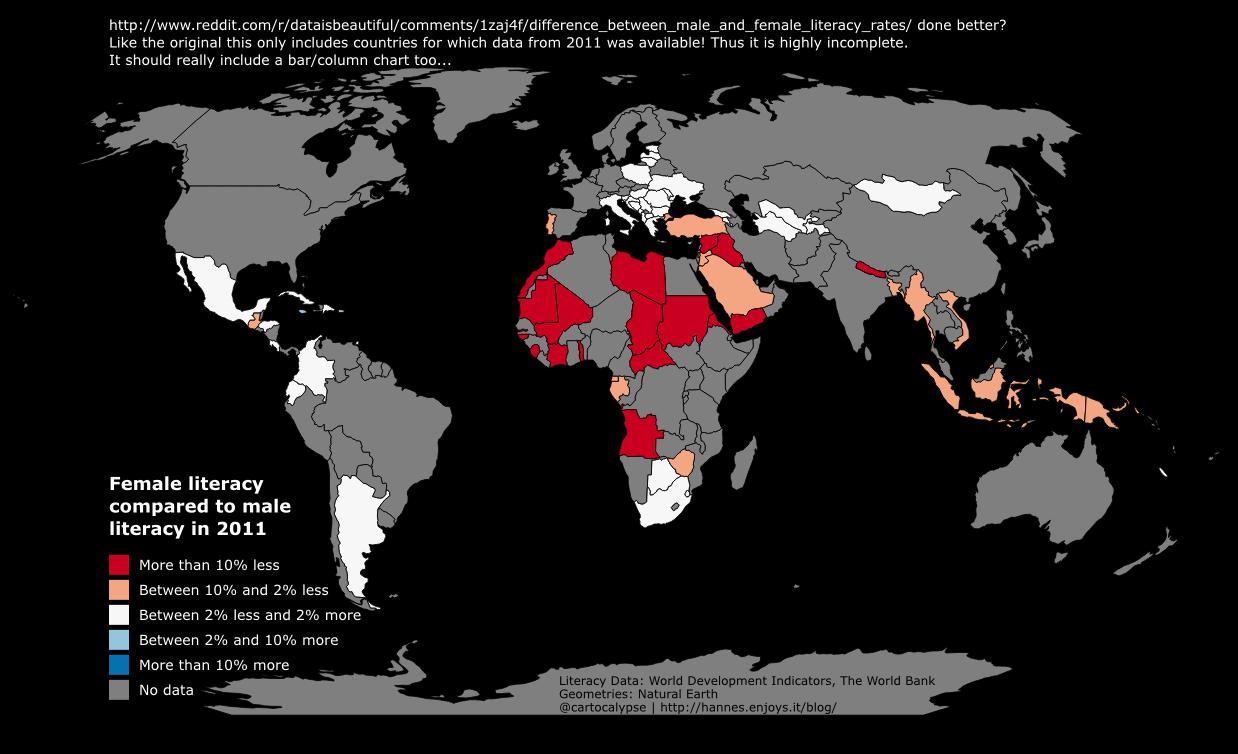
A bad map about gender differences in literacy

Wrote this in 2014, not sure why I did not publish it. It was a response to this bad map.

world bank 2011 female vs male literacy

No need for expensive software, you can use the free and open-source QGIS for this: https://qgis.org/

1. Install QGIS

2. Download and unzip the data http://databank.worldbank.org/data/download/WDI_excel.zip (not sure what license, they want attribution “World Development Indicators, The World Bank”)

3. Download and unzip country geometries http://www.naturalearthdata.com/http//www.naturalearthdata.com/download/50m/cultural/ne_50m_admin_0_countries.zip (public domain but be nice and add attribution “Geometries from Natural Earth”)

4. Open QGIS, Layer -> Add Vector Layer -> choose ne_50m_admin_0_countries.shp

5. Unfortunately the csv is not simple, it has more than one row per country as it includes time series. And it does not have the value we want to map precalculated.

Afghanistan,AFG,"Literacy rate, adult female (% of females ages 15 and above)",SE.ADT.LITR.FE.ZS,,,,,,,,,,,,,,,,,,,,4.98746100000000E+00,,,,,,,,,,,,,,,,,,,,,,,,,,,,,,,,,,
Afghanistan,AFG,"Literacy rate, adult male (% of males ages 15 and above)",SE.ADT.LITR.MA.ZS,,,,,,,,,,,,,,,,,,,,3.03077500000000E+01,,,,,,,,,,,,,,,,,,,,,,,,,,,,,,,,,,
Afghanistan,AFG,"Literacy rate, adult total (% of people ages 15 and above)",SE.ADT.LITR.ZS,,,,,,,,,,,,,,,,,,,,1.81576800000000E+01,,,,,,,,,,,,,,,,,,,,,,,,,,,,,,,,,,
Afghanistan,AFG,"Literacy rate, youth female (% of females ages 15-24)",SE.ADT.1524.LT.FE.ZS,,,,,,,,,,,,,,,,,,,,1.11428000000000E+01,,,,,,,,,,,,,,,,,,,,,,,,,,,,,,,,,,
Afghanistan,AFG,"Literacy rate, youth male (% of males ages 15-24)",SE.ADT.1524.LT.MA.ZS,,,,,,,,,,,,,,,,,,,,4.57960200000000E+01,,,,,,,,,,,,,,,,,,,,,,,,,,,,,,,,,,
Afghanistan,AFG,"Literacy rate, youth total (% of people ages 15-24)",SE.ADT.1524.LT.ZS,,,,,,,,,,,,,,,,,,,,3.00663500000000E+01,,,,,,,,,,,,,,,,,,,,,,,,,,,,,,,,,,

This step is probably the hardest. I will use some Unix tools as I am used to them and they work well. Sorry! You can probably do this with a good texteditor or spreadsheet application as well.

We have “csvcut -c 2 WDI_Data.csv | uniq | wc -l” -> 253 -> 252 country codes (without the header). We have 6 lines per country for the literacy data. We should have at max 252 unique values per field then. TheZeitgeist only used data from 2011.

To make it more convenient to work, I first split off the Literacy data into a new file with

head -n 1 WDI_Data.csv > Literacy.csv; grep Literacy WDI_Data.csv >> Literacy.csv

No idea if TheZeitgeist mixed Adult and Youth, let’s just use the Adult data for now.

head -n 1 WDI_Data.csv > Literacy_adult.csv; grep -E "Literacy rate, adult (fe)*male" Literacy.csv >> Literacy_adult.csv

Next let’s isolate the data for 2011. csvcut seems to have a bug with numerically named columns so we have to use the field’s index (56) instead of its name “2011”.

csvcut -c 2,3,56 Literacy_adult.csv > Literacy_adult_2011.csv

We need to get the data into one line per country, I am lazy so:

grep "Literacy rate, adult female" Literacy_adult_2011.csv > Literacy_adult_2011_female.csv
grep "Literacy rate, adult male" Literacy_adult_2011.csv | sed 's/.*15 and above)",/,/' > Literacy_adult_2011_male.csv
echo "Country Name,Country Code, Literacy Female, Literacy Male" > Literacy_adult_2011_oneline.csv; paste -d "" Literacy_adult_2011_female.csv Literacy_adult_2011_male.csv >> Literacy_adult_2011_oneline.csv

Enough of that commandline mumbojumbo! QGIS time!

Natural Earth has a column named “wb_a3” which is the WB 3 letter country codes, yay!

toreal("Literacy_adult_2011_oneline_Literacy Female") - toreal("Literacy_adult_2011_oneline_Literacy Male")

Figure out the rest yourself. This is where I apparently lost interest in writing back then. ;)
—–

Now make the map better by choosing a projection that does not make Greenland as big as Africa. Also, I would try adding another “attribute” to the display, change the alpha value depending on the absolute literacy.

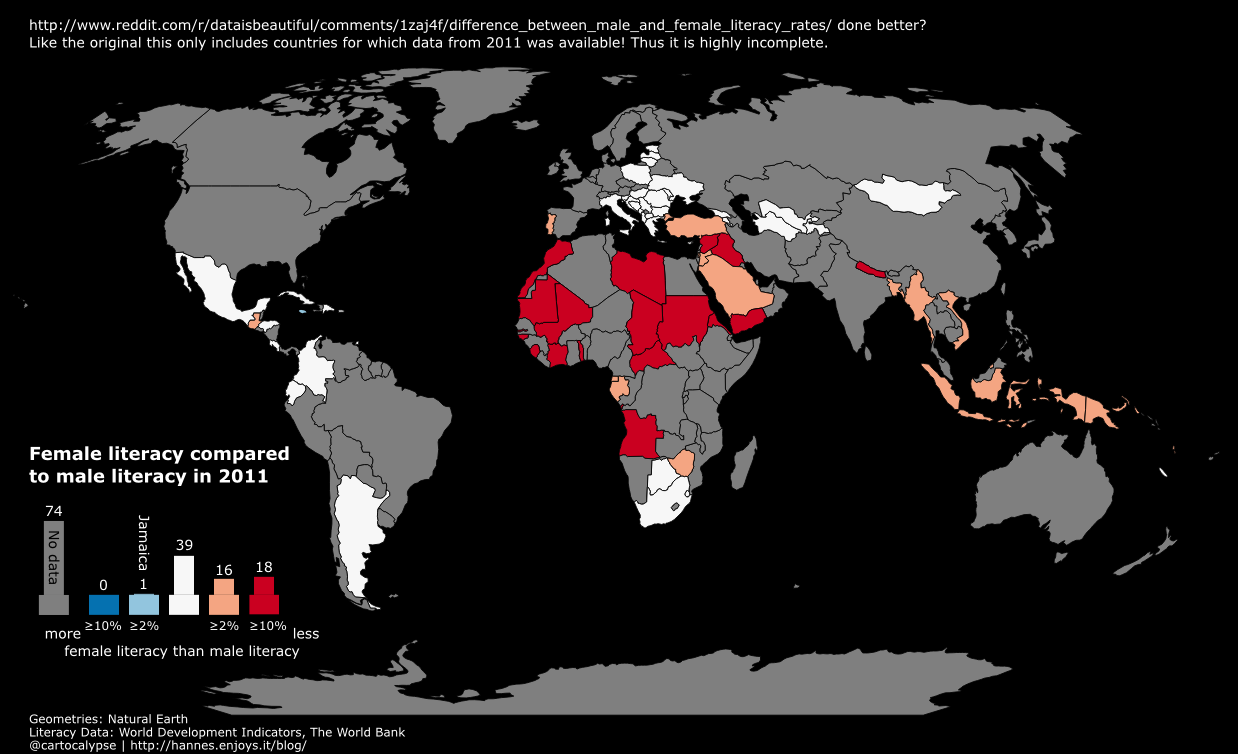
And finally realise that a map is not a good visualisation because you cannot see the values of tiny countries. Make a bar chart instead. ;)

world bank 2011 female vs male literacy plus bar

e-foto (free GNU/GPL educational digital photogrammetric workstation) on Archlinux

I wrote this a year ago and meant to write more. Turns out I did not but it still works. You might need to figure out dependencies yourself. Here you go:

e-foto is a free GNU/GPL educational digital photogrammetric workstation in active development.

svn checkout https://svn.code.sf.net/p/e-foto/code/trunk e-foto-code
cd e-foto-code/c
wget http://download.osgeo.org/shapelib/shapelib-1.3.0.tar.gz
tar xfv shapelib-1.3.0.tar.gz
mv shapelib-1.3.0 shapelib
cd ..
mkdir build
cd build
qmake-qt4 ../e-foto.pro 
make

Ready to run in

../bin/e-foto

A simple and hacky column chart in HTML & CSS

This is a draft from two years ago, I just thought I would publish it in case it is useful for anyone. I don’t remember anything about it, not even what it was for. Feel free to use it in any way you like.

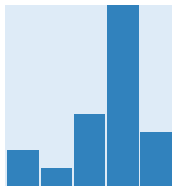
It looks like this:

htmlcsscolumnchart

#histogramcontainer {
height: 20%;
width: 10%;
background-color:#deebf7;
position:relative; /* To make the children's percentages relative */
 
/* setting position="absolute" bottom="0" on the histodivs makes them all overlay each other horizontally */
 
/* http://stackoverflow.com/questions/2147303/how-can-i-send-an-inner-div-to-the-bottom-of-its-parent-div */
-moz-transform:rotate(180deg);-webkit-transform:rotate(180deg); -ms-transform:rotate(180deg);
 
}
 
div.histogrambar {
float:left;
width:19%;
background-color:#3182bd;
}
 
div#histogrambar_a {height: 20%; margin-left: 1%;}
div#histogrambar_b {height: 10%; margin-left: 1%;}
div#histogrambar_c {height: 40%; margin-left: 1%;}
div#histogrambar_d {height: 100%; margin-left: 1%;}
div#histogrambar_e {height: 30%;}
<div id="histogramcontainer">
<div class="histogrambar" id="histogrambar_e"></div>
<div class="histogrambar" id="histogrambar_d"></div>
<div class="histogrambar" id="histogrambar_c"></div>
<div class="histogrambar" id="histogrambar_b"></div>
<div class="histogrambar" id="histogrambar_a"></div>
</div>

ffmpeg on raspbian / Raspberry Pi

Since http://www.jeffreythompson.org/blog/2014/11/13/installing-ffmpeg-for-raspberry-pi/ is a bit messy, here is how you can compile ffmpeg with x264 on raspbian. Changes are building in your home directory, getting just a shallow git clone and building with all CPU cores. Also no unnecessary sudo…

Read the comments below!

# In a directory of your choosing (I used ~/ffmpeg):

# build and install x264
git clone --depth 1 git://git.videolan.org/x264
cd x264
./configure --host=arm-unknown-linux-gnueabi --enable-static --disable-opencl
make -j 4
sudo make install
 
# build and make ffmpeg
git clone --depth=1 git://source.ffmpeg.org/ffmpeg.git
cd ffmpeg
./configure --arch=armel --target-os=linux --enable-gpl --enable-libx264 --enable-nonfree
make -j4
sudo make install

Read the comments below!

Hopefully someone, somewhere will provide a repository for this kind of stuff some day.

It takes just 25 minutes on a Raspberry Pi 3. Not hours or days like some old internet sources on old Raspis say.

In case you are wondering v4l2 should work with this.

WFS-T on Geoserver

If you encounter an error like
ERROR 1: Error returned by server :

java.lang.IllegalArgumentException: argument type mismatch
argument type mismatch


you probably have a mismatch between WFS versions. Try changing your WFS url to a specific version. Using http://www.example.com/geoserver/sf/ows?strict=true&version=1.0.0 worked for me after I spent hours with that stupid error…

If you add features to your store but nothing new appears on the map, check if the features actually end up with geometries on your server… Eg if you try to add LineStrings to a MultiLineString layer via Geoserver WFS-T you will get objects without geometries. This happens silently, at least when using the osgeo ogr module in Python.

If every request takes 10 seconds your server might time out trying to parse your schema. Check your geoserver logs for things like
2016-03-10 15:48:00,486 WARN [geotools.xml] - Error parsing: http://123.123.123.123.:8080/geoserver/ows?strict=true&VERSION=1.0.0&SERVICE=WFS&REQUEST=DescribeFeatureType&TYPENAME=my:layer

If you know how to find out how to debug this please tell me:
2016-03-10 15:48:00,501 ERROR [geoserver.wfs] - Transaction failed
org.geoserver.wfs.WFSTransactionException: Error performing insert: null
at org.geoserver.wfs.InsertElementHandler.execute(InsertElementHandler.java:215)
at org.geoserver.wfs.Transaction.execute(Transaction.java:322)
(... a million more steps truncated...)

Properly splitting a file at specific intervals with ffmpeg

Ever wanted to split a media file (video, audio, both) into segments of 10 minutes or something like that? The internet is full of terrible hacks and shitty Stack Overflow answers for this. So here is how you easily, properly split a file into same-length segments with ffmpeg.

-f segment -segment_time SECONDS fileprefix%04d.ext

Done. segment_time takes seconds as argument. For example:

ffmpeg -i recording.opus -c:a libvorbis -f segment -segment_time 3600 recording_%04d.ogg

or

ffmpeg -i huge.wav -c:a copy -f segment -segment_time 600 huge-%04d.flac

Not so hard, is it?

Let’s Encrypt with Lighttpd

Save the page https://gethttpsforfree.com/ locally and use a clean browser to open the HTML file.
Create your keys and everything.
Cat domain.key and chained.pem into a new pemfile.
Grab the Let’s Encrypt Authority X1 (IdenTrust cross-signed) pemfile from https://letsencrypt.org/certificates/
Put those two files in a safe place on your server.
Don’t forget to set proper permissions on the files.
ssl.ca-file = "/path/to/lets-encrypt-x1-cross-signed.pem" # the Let's Encrypt certificate
ssl.pemfile = "/path/to/pemfile.pem" # your pemfile

Restart lighttpd.
Done.